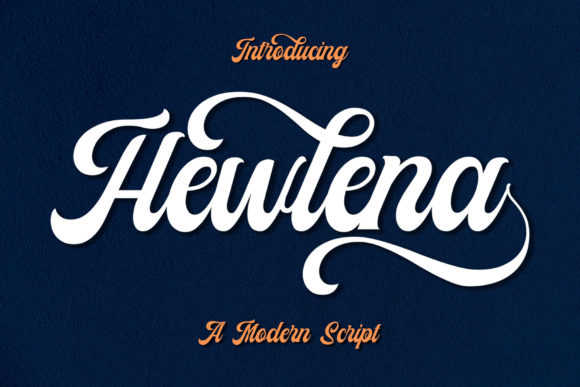
Hewlena: A Bold Handwritten Font for Confident, Nostalgic Headlines and Logotypes
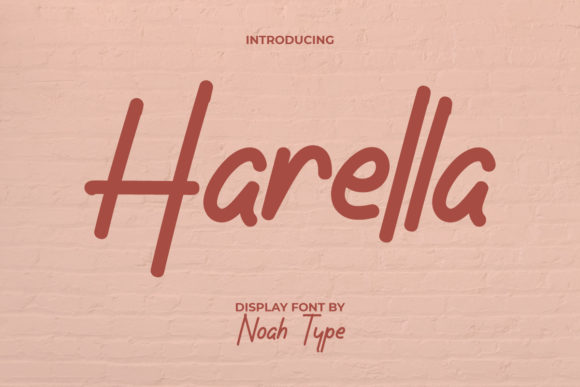
Hewlena isn’t just another script font—it’s a deliberate design choice for creators who want their headlines and logotypes to communicate strength, personality, and timeless appeal. Crafted as a gorgeous and bold handwritten typeface, Hewlena delivers a retro touch without leaning into kitsch or caricature. Its confident letterforms, dynamic contrast, and intentional irregularities make it read as human-made yet highly controlled—ideal when authenticity and impact must coexist.
Where Hewlena Fits in Your Design Workflow
Fonts aren’t selected in isolation; they’re chosen in context. Hewlena enters your process most meaningfully during the visual identity refinement or headline articulation phase—not at the start of brainstorming, and rarely at the final export stage. Think of it as a precision tool: you sketch ideas in neutral sans-serifs or system fonts, define hierarchy and tone through layout and copy, then bring in Hewlena once the message is locked and the emotional direction is clear.
This timing matters. Applying Hewlena too early can distract from structural decisions—like spacing, scale, or readability across devices. Using it too late risks retrofitting, where letterfit or kerning adjustments become reactive fixes instead of intentional refinements. In practice, many designers reserve Hewlena for final headline treatments, logo lockups, poster titles, or hero section banners—places where visual weight and character drive immediate perception.
Before You Use Hewlena: Preparation That Pays Off
Preparation starts with understanding its limits and strengths. Hewlena is optimized for display use—not body text. Its boldness and hand-drawn texture thrive at 36pt and above in print, or 48px+ on screen. It includes standard Latin characters, numerals, and basic punctuation, but lacks extended language support (e.g., Cyrillic or Vietnamese diacritics). If your project targets global audiences or requires multilingual consistency, plan for fallbacks—or pair Hewlena with a clean, neutral companion font for supporting text.
Also consider file format and licensing. Hewlena is typically delivered as OTF or TTF. For web use, convert and serve it via @font-face with WOFF2 compression and appropriate font-display: swap settings to avoid invisible text during load. Test rendering across browsers—especially Safari and older Edge versions—where hinting and antialiasing can affect how its bold strokes hold up at smaller sizes.
During Implementation: Pairing, Spacing, and Context
Hewlena works best when contrasted—not matched. Its confidence gains clarity next to restrained, geometric, or monolinear typefaces. Try pairing it with Inter, Poppins, or Work Sans for digital interfaces; with Freight Text or Adobe Garamond for editorial layouts. Avoid other decorative or high-contrast scripts—they compete rather than complement.
Kerning is non-negotiable. While Hewlena ships with built-in kerning pairs, manual adjustments are often needed for custom word combinations—especially in logos. “HEWLENA” itself benefits from tightening between W–L and L–E; “COFFEE” may need extra space after the double F. Use glyph panels in design tools (Figma, Illustrator, or Affinity) to preview alternates and adjust spacing visually—not numerically.
Color and background matter more than usual. Because Hewlena’s strokes vary in thickness and edge texture, low-contrast combinations (e.g., light gray on white) can blur its definition. Solid, saturated backgrounds—deep navy, charcoal, or warm terracotta—anchor its presence. For accessibility, ensure text contrast meets WCAG AA standards (4.5:1 minimum for normal text, though Hewlena is rarely used at small sizes).
After Deployment: Consistency, Maintenance, and Long-Term Use
Once Hewlena is live—in a brand guideline, website CSS, or design system—it becomes part of your asset infrastructure. Document usage rules clearly: specify primary applications (logos, H1s, event banners), prohibited uses (captions, data tables, mobile navigation), and minimum size thresholds. This prevents drift—like a team member applying it to a button label because “it looked cool.”
Version control matters if you’re using Hewlena across multiple platforms. Keep a master font file with metadata (license date, vendor URL, version number) in your shared assets folder. When updating, test all touchpoints: email templates, social graphics, printed brochures, and CMS-stored headings. A single character shift—say, in the ampersand or quotation mark—can break a carefully balanced logo lockup.
Real-World Integration Examples
A freelance educator launching an online course: They draft lesson titles in Helvetica to focus on clarity and learning outcomes. Once modules are finalized, they apply Hewlena to course headers in Canva and LMS banners—keeping body text in Open Sans. The font signals approachability and craft, reinforcing the instructor’s hands-on teaching style without sacrificing scannability.
A small-batch coffee roaster rebranding: Their initial mood board includes vintage diner signage and 1970s packaging. Hewlena anchors the new logo, paired with a tight, no-frills sans-serif for origin details and roast dates. Print files use outlined Hewlena to avoid font substitution in commercial printers; web files use variable-weight fallbacks only where necessary.
A blogger redesigning their newsletter header: Instead of defaulting to a trending script, they test Hewlena against three audience segments via A/B subject lines. Open rates improve 12% with Hewlena-treated headers—likely due to increased visual distinction in crowded inboxes. They retain it only for the top banner, not inline quotes or pullouts, preserving hierarchy and loading speed.
Compatibility and Cross-Platform Considerations
Hewlena integrates smoothly with modern design and development tools—but awareness prevents friction. In Figma, it appears in the font menu once installed locally or added via Google Fonts (if available there) or a licensed font service like Adobe Fonts. In WordPress, upload via theme customizer or use a plugin that supports local font hosting. For Notion or Airtable, it won’t render natively—so use it only in exported assets, not inline docs.
For developers, avoid embedding Hewlena directly in CSS via base64. Host it on your domain or CDN, preload critical weights, and define font-weight explicitly—even if the font only has one weight—to prevent browser weight interpolation. Always declare font-style: normal, since Hewlena doesn’t include italic variants.
Quality Control Beyond the Obvious
True quality control with Hewlena goes beyond checking for missing glyphs. Audit how it performs under real conditions: Does the “S” stroke hold up in a 200dpi Instagram Story? Does the “g” descender clip in a constrained card layout on mobile? Does the font flicker during scroll-triggered animations in Chrome?
Build simple test cases: a responsive heading block, a logo mockup across device frames, and a dark-mode toggle. Run them through Lighthouse for performance impact and axe for contrast compliance. If Hewlena increases font load time by more than 200ms, consider subsetting—removing unused characters (accents, symbols, numerals) via a tool like Glyphhanger or Transfonter.
Finally, revisit usage every 6–12 months. Trends evolve, but so do your goals. What felt bold and nostalgic at launch may read as dated or overused if applied everywhere. Rotate Hewlena into seasonal campaigns or limited-edition assets—keeping it special, intentional, and effective.